
Most architecture proposals describe the design phases in detail and give approvals one line: "Assist the owner with obtaining required permits."
That line hides most of what the client is worried about. The client wants to know how long until they can build, what could slow it down, and whether the fee they're about to sign will cover it. Those answers depend almost entirely on the permits.
Listing the permits a project will need, in the proposal or in the first weeks of design, answers all three. It shows a prospective client that you already know their jurisdiction, it sets the schedule before anyone has promised an opening date, and it gives you a clear line between the work in your fee and the work that isn't.
Why the Permit List Belongs at the Start
It shows knowledge the client can't get anywhere else
A client comparing proposals sees fees and design phases that look much the same. A permit list is different: naming the planning commission hearing, the health department review and the deferred fire sprinkler submittal for their address shows you've thought about their project. Most clients have never heard of a conditional use permit. Hearing about it from you before it costs them anything builds trust that a portfolio can't.
It sets the schedule before anyone else does
Clients often arrive with a move-in date, a lease start or a loan deadline already in mind. If the project needs a discretionary approval with public notice and a hearing, that can add months before plan review even begins. It's much easier to say so in the proposal than to explain it halfway through design, when the date has already been shared with a lender or a landlord.
It protects your fee
This is the reason that matters most to your practice. When the proposal lists the approvals your fee covers, an approval that turns up later is visibly new work. A historic review, a variance or a coastal permit that wasn't on the list becomes an additional service with a clear basis, rather than an uncomfortable conversation where you seem to be asking for more money for something the client assumed was included.
Without the list, "assist the owner with obtaining required permits" can be read to cover any approval the project ever needs.
What to Include
You don't need the full research at proposal stage. You need enough to show the shape of the approvals and to draw the scope line. For each permit or approval:
- The permit and the agency. Use the agency's own name for both: "Conditional Use Authorization, San Francisco Planning" says more than "zoning approval."
- The phase. Separate the zoning and land use approvals that decide whether the project can be built from the plan review permits that decide how. The first group sets the schedule.
- Discretionary or ministerial. A ministerial permit (most building permits) is issued when the drawings meet code. A discretionary approval (conditional use permits, variances, design review, many historic reviews) involves judgment, often public notice and a hearing, and can be denied or conditioned. Discretionary approvals carry most of the schedule risk, and most of the fee risk.
- Who prepares it. Some approvals are yours. Others belong to consultants or contractors: fire sprinkler and fire alarm drawings are often deferred submittals by the fire protection contractor, and trade permits are usually pulled by the contractors themselves. Saying so avoids the assumption that you're producing all of it.
- In scope, or an additional service. The line that protects your fee.
- Approvals that might apply. Some approvals depend on things nobody knows yet: whether the menu needs a grease interceptor, whether the owner adds outdoor seating, whether the building turns out to be historic. List them separately, so they're expected if they come up.
For the phase-by-phase lists for common project types, see our checklists for ADUs, tenant improvements and restaurants.
How to Word It So It Isn't a Promise
A reasonable worry: if you list the permits and miss one, have you guaranteed something you couldn't know?
Not if the list says what it is. Call the section Anticipated Permits and Approvals, say what it's based on, and say when it will be confirmed. For example:
The permits and approvals below are anticipated based on the project address, the proposed use and the jurisdiction's published requirements as of the date of this proposal. They will be confirmed at the pre-application meeting and again at the end of schematic design. Approvals listed as possible, or not listed, may be provided as additional services, subject to the owner's authorization.
Owner–architect agreements generally treat applying for approvals as the owner's responsibility, with the architect assisting, so check that your list reads consistently with the agreement you're attaching it to. If you're unsure how your contract language and the list work together, your professional liability insurer is a good first call.
💡 Date the list. Jurisdictions change their requirements, fees and review targets. A dated list makes clear that a later change is new information, not something you missed.
A Sample: Valencia Street Cafe
Here's how the section might read for a hypothetical project: a counter-service cafe in a former retail space on Valencia Street in San Francisco.
Anticipated Permits and Approvals (as of October 14, 2026)
Zoning and land use
- Conditional Use Authorization, San Francisco Planning. Discretionary; includes public notice and a Planning Commission hearing. Anticipated if converting this retail space to a restaurant requires one, to be confirmed at the pre-application meeting. Application, hearing preparation and attendance are an additional service.
Plan review
- Building permit, Department of Building Inspection. Ministerial. Includes the tenant improvement and accessibility upgrades. Included.
- Health department plan review, Department of Public Health, Environmental Health. Kitchen layout, equipment and finishes. Included.
- Fire sprinkler permit, Department of Building Inspection, reviewed by the Fire Department. Deferred submittal prepared by the fire protection contractor; we coordinate and review. Coordination included.
- Electrical, plumbing and mechanical permits, Department of Building Inspection. Pulled by the contractors after the building permit is issued. Coordination included.
- Sign permit, Department of Building Inspection. Included if we design the signage; otherwise by the sign contractor.
Might apply
- Grease interceptor permit, if the final menu calls for one. Additional service.
- Outdoor dining permit, if the owner adds sidewalk seating. Additional service.
Schedule: the conditional use authorization, if required, comes before the building permit and sets the overall schedule. San Francisco publishes its review targets; see our San Francisco permit guide for the current figures.
That's about half a page. It tells the client what's coming, where the risk is, what they're paying for, and what would change the fee.
"Isn't This Giving Away Work?"
Sometimes a prospective client takes the list and hires someone cheaper. That can happen, but the list isn't the work. Knowing that turning a retail space on Valencia Street into a cafe may need a conditional use authorization is useful. Getting it approved, with the drawings, the neighborhood outreach and the hearing, is the work, and that's what the fee pays for.
Keep the proposal list at the level above: permit, agency, scope. The detailed research, including submittal requirements, fees and review comments from past projects, belongs in pre-design, where it's billable.
Keep the List Going After the Contract Is Signed
A permit list in a proposal is a promise about how you'll run the project. Its value comes from keeping it up to date:
- Confirm it at the pre-application meeting, and send the client the revised list.
- Revisit it at the end of schematic design, when the program and the menu (or the unit count, or the floor area) are settled.
- Turn each permit into dated milestones: submitted, comments received, revisions submitted, approved, issued. See the permit milestones every architect should track.
- Report against it, so the client hears about a delay from you before they ask. Clients notice when they don't hear anything; see why regular permit updates matter from their side.
Build the List and the Dashboard With Permitful
Permitful turns the proposal list into the project's permit tracker, and gives the client a page to check instead of emailing you.
Start with Permit Advisor. Create a project with the address and project type, and Permit Advisor searches official city, county and state sources and suggests the permits the project likely needs, split into zoning/land use and plan review phases. It marks each suggestion as required or likely, lists those that might apply separately, and names permits worth checking with the agency directly, which maps neatly onto the in-scope and might-apply parts of your proposal. Every suggestion cites the government pages it came from, so you can check it before it goes into a proposal.
Add the milestones. Add the standard milestone sequence for each permit's type, dated from the start date you choose, then add your own.
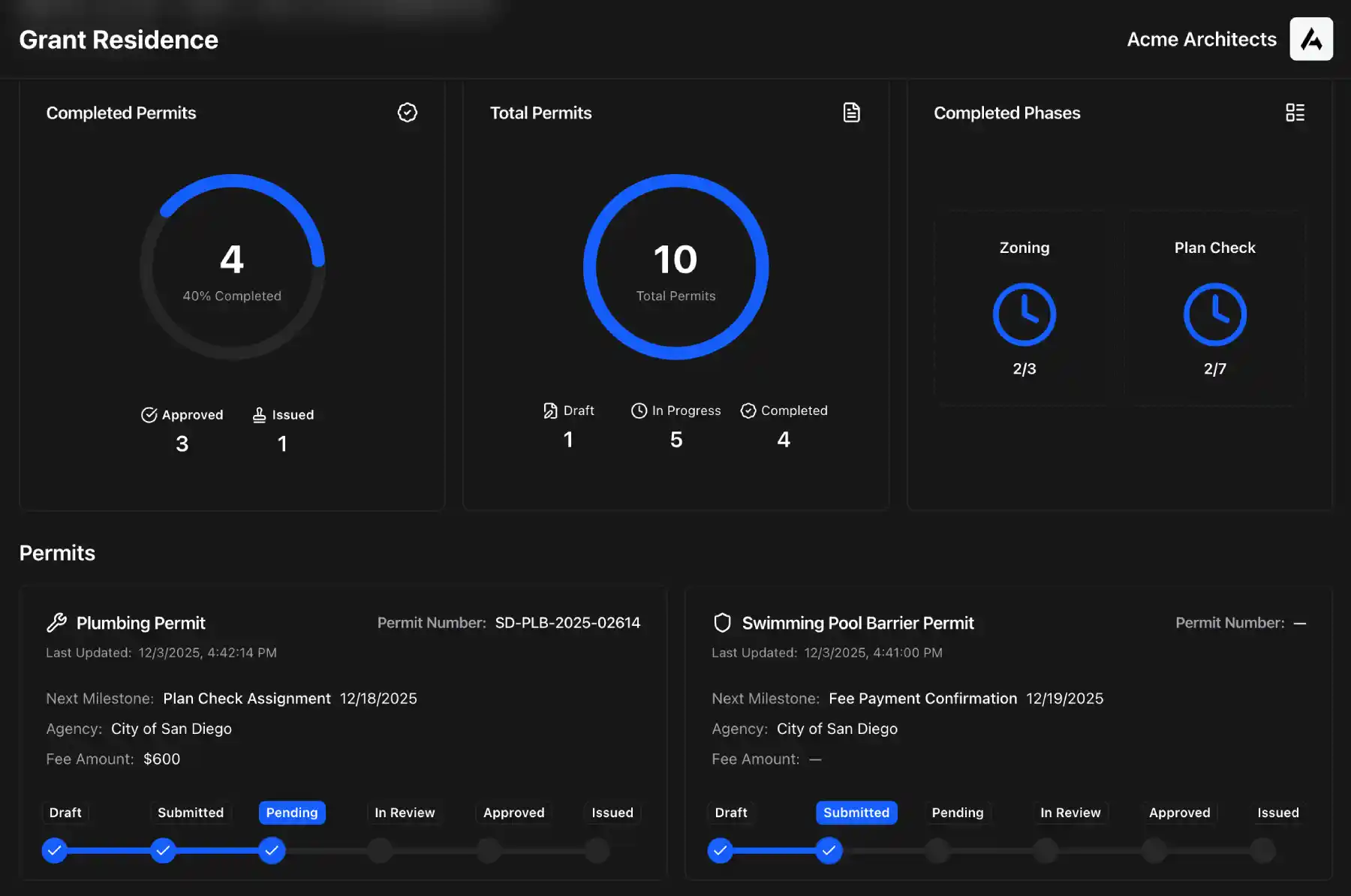
Share the dashboard. Every project has a public dashboard you can send to the client: their project, every permit and its status, and the upcoming milestones, under your firm's name and logo. Mark a milestone private to keep it off the dashboard; notes are never shown. The client sees progress through the design and approval process without a weekly status email. See an example dashboard.
Your first project is free, including a Permit Advisor run, so you can build the list for a proposal you're writing now. Pro adds unlimited projects and Advisor runs, the client dashboards and a calendar feed of every milestone and permit expiration; see pricing.